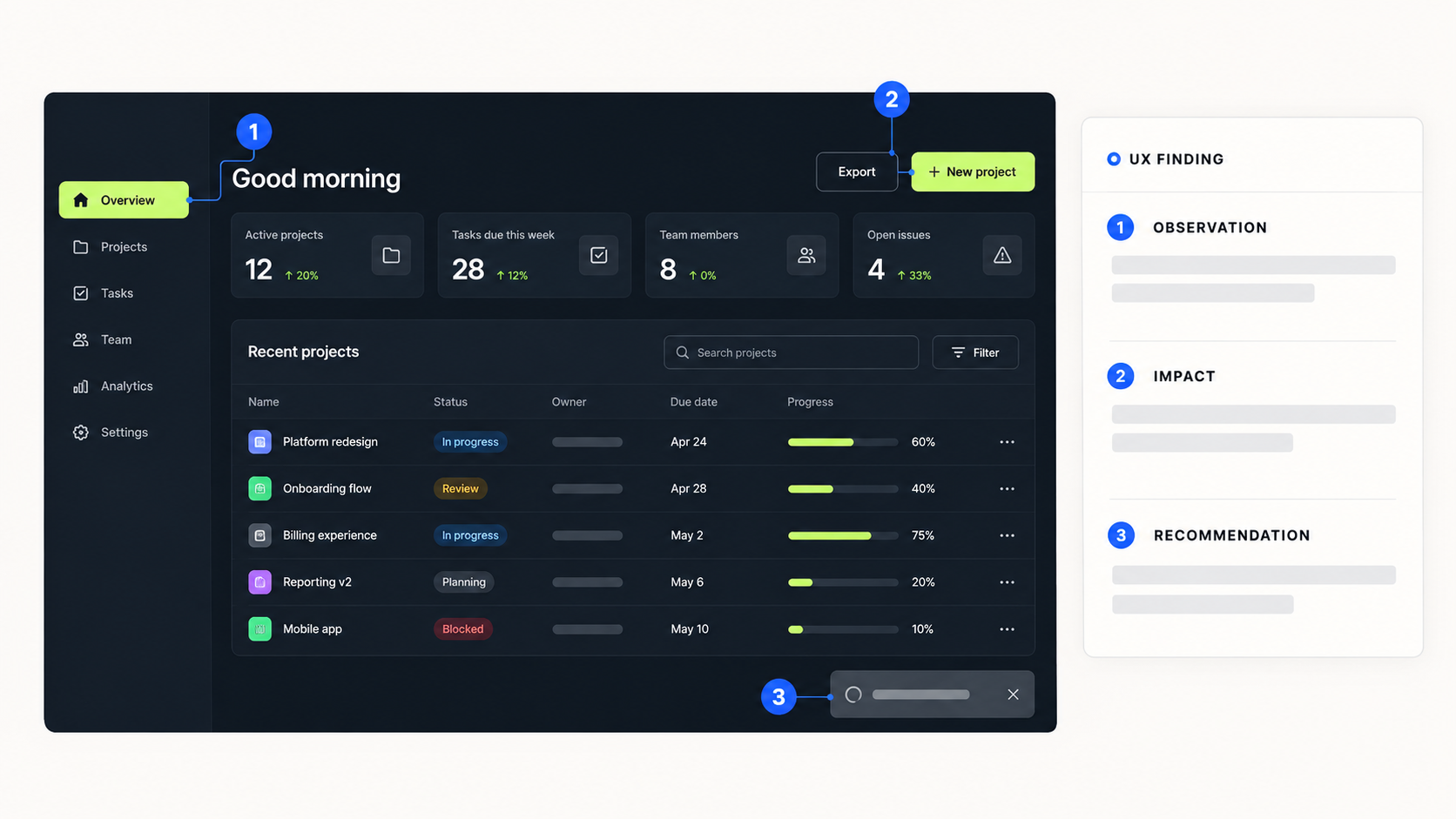
A UX audit is a structured review of a digital product that identifies where users may struggle, why those problems matter, and which improvements deserve attention first.
For a SaaS product, an audit can examine critical journeys such as signing up, completing onboarding, navigating the product, managing data, inviting team members, or recovering from an error.
The outcome should be more useful than a collection of interface opinions. A good UX audit connects every finding to a user task, explains the available evidence, and gives the product team a clearer basis for deciding what to investigate or improve next.
Quick answer
A SaaS UX audit reviews important product journeys, identifies potential usability and interface problems, and turns the findings into prioritized recommendations.It can clarify where friction may exist, but an expert review alone cannot prove how every user behaves. Analytics, customer feedback, and usability testing may still be needed to validate important findings.
What is a UX audit?
A UX audit is an evaluation of how well a product supports its users in completing important tasks.
The review combines product context, expert evaluation, established usability principles, and any available evidence. The goal is to identify potential friction and give the product team a clearer direction for improvement.
A finding becomes more useful when it is connected to a user task and evidence instead of being presented as a personal design preference.
For example, saying that a dashboard “feels too busy” is vague. A stronger finding would explain that several actions have the same visual weight, making it difficult for a first-time user to identify the primary task.
What can a SaaS UX audit review?
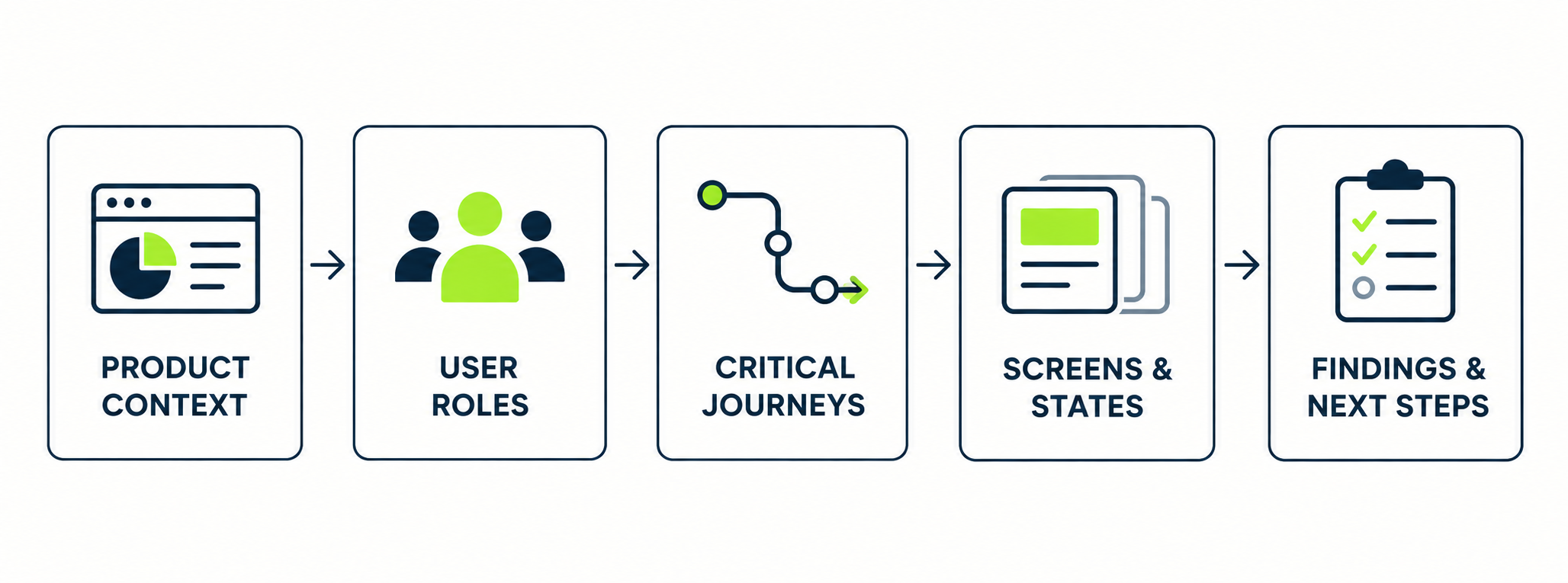
The scope depends on the product and its priorities. A typical audit may include the following areas.
| Area | What the audit examines |
|---|---|
| Navigation | Whether users can locate important sections and understand their current position |
| User flows | Whether users can complete essential tasks without unnecessary steps or confusion |
| Onboarding | Whether new users can reach the first useful outcome |
| Interface content | Whether labels, instructions, and messages are clear and consistent |
| Forms | Whether users can enter information, understand requirements, and recover from errors |
| Dashboards | Whether metrics support a defined task or decision |
| Product states | Whether empty, loading, error, success, and restricted states are handled clearly |
| Roles and permissions | Whether users understand access levels and permission changes |
| Design consistency | Whether similar components and actions behave consistently |
| Accessibility | Whether visible barriers affect keyboard use, contrast, structure, or comprehension |
What a UX audit is not
A UX audit is not simply a visual critique.A polished interface can still contain confusing navigation, missing states, unclear terminology, or a difficult onboarding journey. An older-looking interface can still support its primary task effectively.An audit should therefore consider more than colors, spacing, and typography.
- A UI review focuses mainly on interface presentation and visual consistency.
- Usability testing observes representative participants attempting defined tasks.
- Product analytics reveals patterns such as abandonment, errors, and feature usage.
- Customer research helps explain users’ expectations, motivations, and concerns.
- A UX audit combines the available context with an expert evaluation of selected product journeys.
These methods can complement each other. The right combination depends on the question the product team needs to answer.
When does a SaaS product need a UX audit?
A UX audit is useful when a team knows the product experience needs attention but does not yet have a clear, evidence-based improvement plan.
| Situation | What may be happening | How an audit can help |
|---|---|---|
| Users do not reach value | Signup is completed, but setup or a key action is abandoned | Review the journey and identify possible friction |
| The product has grown quickly | Features and patterns were added without a shared structure | Identify navigation, workflow, and consistency problems |
| The team is considering a redesign | It is unclear how much of the product needs to change | Separate structural problems from focused improvements |
| Analytics shows friction | The team knows where users leave, but not why | Develop hypotheses that can be validated |
| Support questions repeat | Customers need help with the same tasks | Connect support themes to product problems |
| The interface is inconsistent | Similar actions behave differently | Identify patterns that need standardization |
The audit does not automatically prove the cause behind every metric or support request. It helps the team form stronger hypotheses and determine what should be improved, investigated, or tested next.
When a UX audit may not be enough
A UX audit cannot answer every product question.
If the team needs to understand why customers choose the product, which problem should be solved next, or how users behave in a specific environment, broader product research may be required.
Usability testing is especially useful when the team needs to observe whether representative users can complete a task and understand where they hesitate.
- The product goal is unclear
- Representative user journeys have not been defined
- Important screens or account roles are unavailable
- The team has little information about its users
- The problem is mainly technical or performance-related
- A regulated workflow requires specialist review
These limitations should be made visible rather than presenting assumptions as confirmed facts.
The SaaS UX audit process
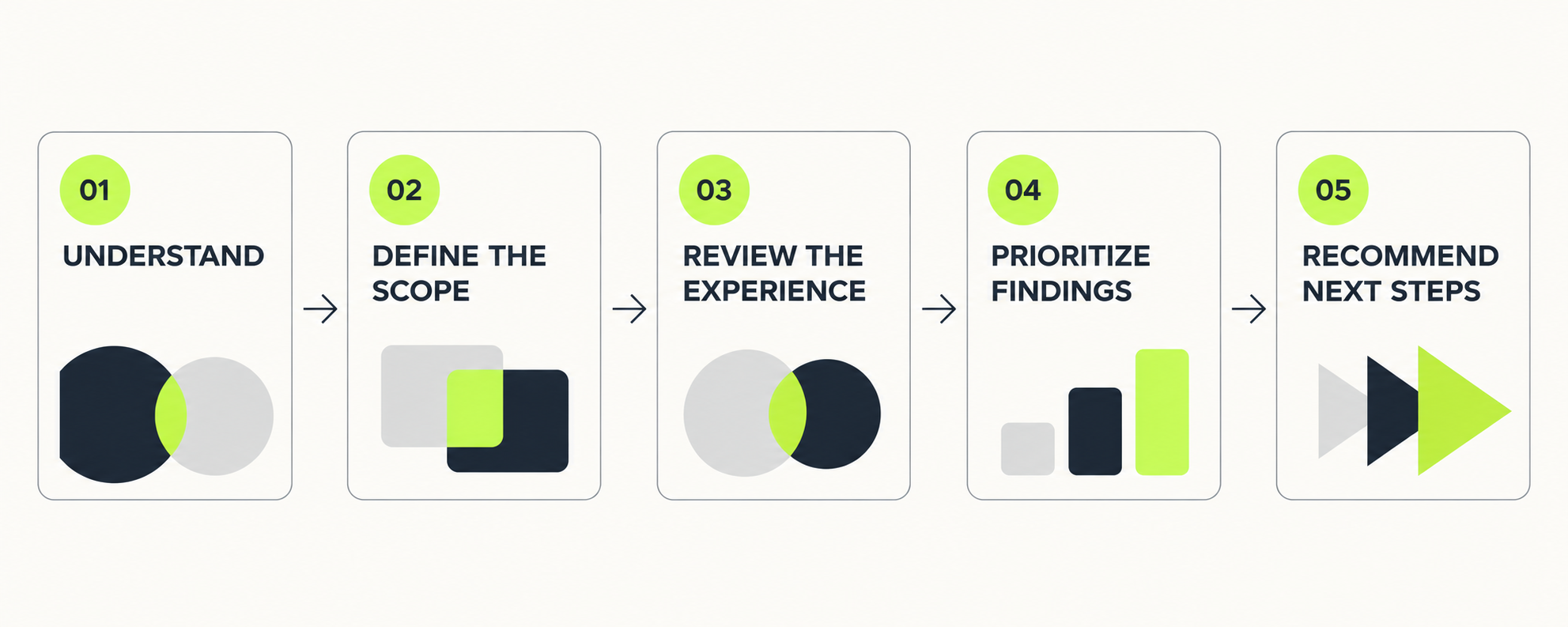
The exact process depends on the product, its complexity, the number of user roles, and the available evidence. A focused SaaS UX audit usually follows five stages.
| Stage | Main question | Output |
|---|---|---|
| 1. Understand | What does the product do, for whom, and under which constraints? | Product context and audit questions |
| 2. Scope | Which roles, journeys, platforms, and states will be reviewed? | Defined audit scope |
| 3. Review | Where might users encounter friction or uncertainty? | Documented observations |
| 4. Prioritize | Which findings matter most, and how strong is the evidence? | Prioritized findings |
| 5. Recommend | What should be improved, investigated, or tested next? | Action plan and validation questions |
1. Understand the product context
The review starts by understanding the product before evaluating its interface.
- The product’s purpose and business model
- The users and account roles it serves
- The most important user journeys
- Current product priorities
- Known customer complaints
- Support and sales feedback
- Available product analytics
- Technical or business constraints
- Previous research or design decisions
Without this context, a reviewer may identify something that looks unusual without understanding why it exists. The goal is to define the questions the audit needs to answer.
2. Define the scope
Trying to review every screen with the same depth can produce a long report with little direction. A focused audit selects journeys based on product importance, user impact, available evidence, and current business priorities.
- Account creation
- Initial product setup
- Reaching the first useful outcome
- Completing a frequent task
- Managing an error or interruption
- Inviting a teammate
- Changing roles or permissions
- Upgrading an account
The scope should state which platforms, roles, journeys, and product states are included. It should also explain what falls outside the review.
3. Review the selected experience
Each journey is reviewed from the perspective of the intended user and task.
- Does the user understand what to do next?
- Is information presented in a useful order?
- Does the interface explain its current state?
- Are actions and their consequences clear?
- Is important information missing?
- Are similar patterns consistent?
- Can users prevent or recover from mistakes?
- Does the flow handle empty, loading, success, and error states?
- Are there visible accessibility barriers?
- Does the experience create unnecessary work?
The location and context of each meaningful observation should be documented.
4. Document and prioritize the findings
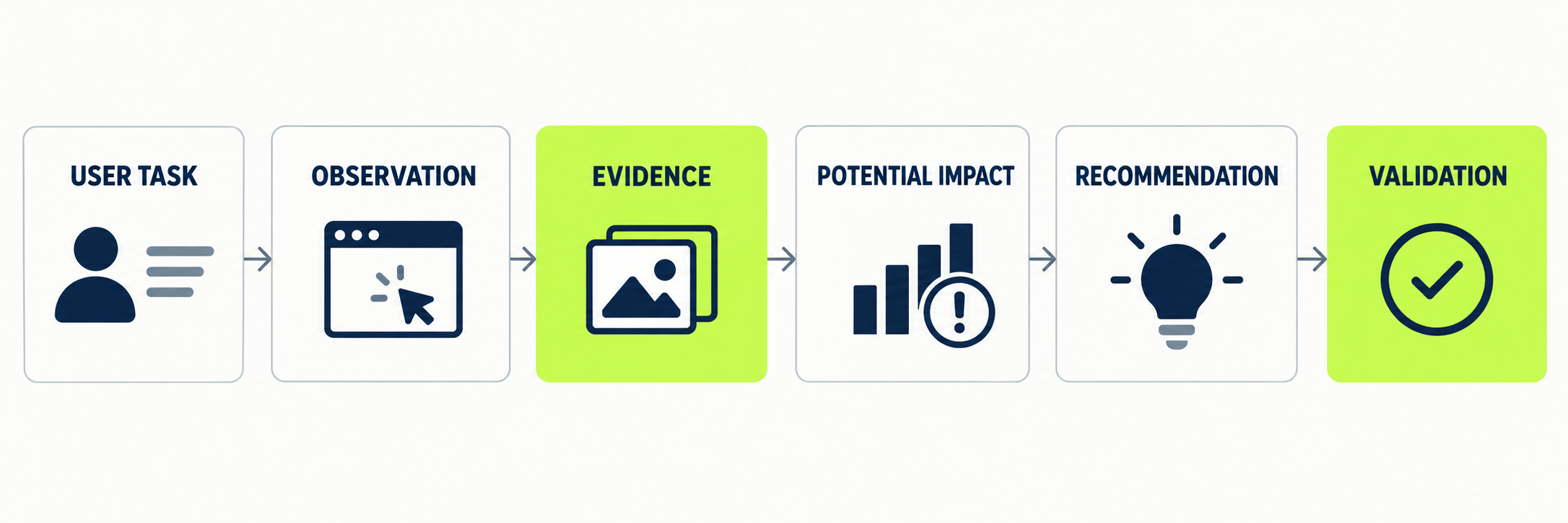
A useful finding contains more than a screenshot and a suggestion. It explains the affected task, the available evidence, the potential impact, and what should happen next.
| Finding field | What it should explain |
|---|---|
| Context | Where the issue appears |
| User task | What the user is trying to complete |
| Observation | What may create difficulty |
| Evidence | What supports the observation |
| Potential impact | How the issue could affect the task |
| Recommendation | A possible improvement direction |
| Limitation | What remains uncertain |
| Validation | How the recommendation can be tested |
5. Turn the findings into an action plan
The audit should help the team decide what happens next.
- Improvements that can be implemented with reasonable confidence
- Problems that require more research or testing
- Structural issues that need product-level discussion
- Design-system inconsistencies
- Lower-priority refinements
- Technical or accessibility issues that need specialist input
The team can then connect the recommendations to its product roadmap, backlog, design work, or research plan.
An example UX audit finding
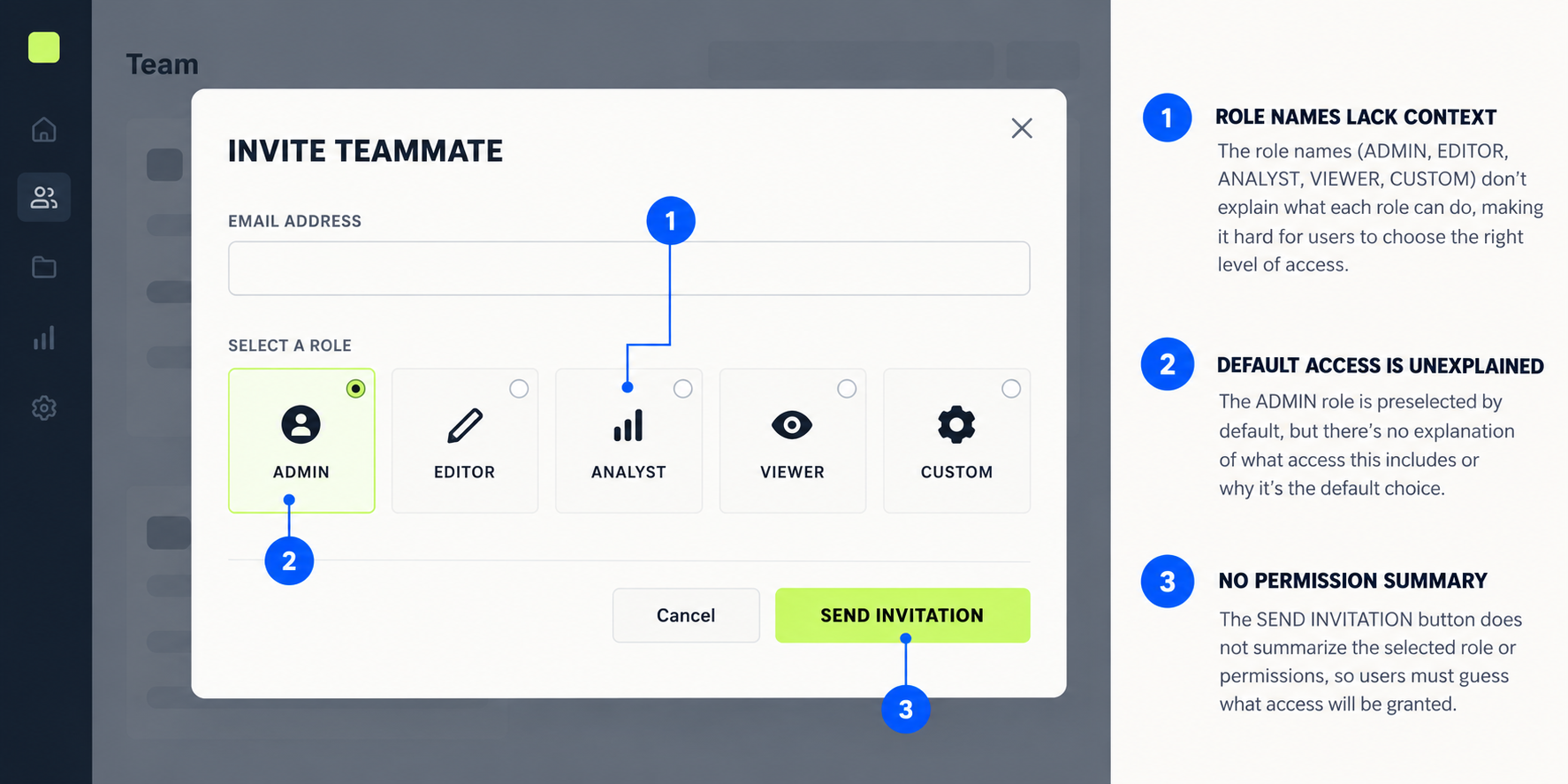
Imagine a SaaS platform where administrators can invite teammates during onboarding.
The invitation screen includes five permission options, but the differences between them are not explained. The default selection gives broad access, and the confirmation message does not summarize what the invited person will be able to do.
| Field | Example2 |
|---|---|
| User task | Invite a teammate with the correct access level |
| Observation | Role names appear without explaining their permissions |
| Potential impact | Administrators may delay the invitation or grant broader access than intended |
| Available evidence | Expert interface review and repeated support questions |
| Recommendation | Explain roles through permitted tasks and summarize access before confirmation |
| Validation | Review permission-change data and test the flow with representative administrators |
This is an illustrative example created to explain the audit process. It does not represent a measured client result, and the recommendation does not guarantee an improvement in a specific business metric.
What should a UX audit deliver?
The exact deliverables depend on the agreed scope. A useful audit may include the following.
| Deliverable | Purpose |
|---|---|
| Executive summary | Provides an overview of the main patterns and risks |
| Scope map | Shows the roles, journeys, platforms, and states included |
| Documented findings | Explains each problem in its product context |
| Annotated screens | Directs attention to specific interface elements |
| Prioritized recommendations | Helps the team decide what needs attention first |
| Validation questions | Separates recommendations from unconfirmed assumptions |
| Suggested next steps | Connects findings to design, research, development, or product decisions |
How long does a UX audit take?
The timeline depends on the size and complexity of the selected scope. Reviewing one critical journey is different from auditing an entire multi-role SaaS product.
| Scope factor | Why it affects the audit |
|---|---|
| Number of journeys | Each journey includes different screens and states |
| Number of user roles | Roles may see different navigation, data, and permissions |
| Platforms | Web and mobile experiences may require separate reviews |
| Available evidence | Analytics and research require interpretation |
| Product states | Errors, permissions, and large data sets expand the scope |
| Research requirements | Testing adds recruitment and analysis work |
| Deliverable depth | A summary differs from an implementation-ready report |
| Review rounds | Stakeholder discussion may reveal new constraints |
The scope should be defined before setting a reliable timeline.
How to prepare for a UX audit
A product team can make the review more useful by preparing:
- A short product overview
- Primary users and account roles
- Important journeys and current priorities
- Access to the relevant product environment
- Known problems or unanswered questions
- Available product analytics
- Support, customer-success, and sales feedback
- Previous user research
- Technical or regulatory constraints
- Areas that should remain unchanged
The team does not need perfect documentation before starting. Missing information should be identified as a limitation or a question to investigate.
What makes a UX audit useful?
A useful UX audit creates clarity.
It explains which experience was reviewed, what problems were observed, why they matter, what evidence supports them, and what the product team can do next.
It also distinguishes between an expert observation and a validated conclusion.
The strongest audit is not necessarily the one with the largest number of findings. It is the one that helps the team focus on meaningful product decisions.
Need a clearer view of your product experience?
A focused UX audit can help your team review important product journeys, organize usability findings, and define the next steps.
Discuss your UX audit scopehttps://abdelmajed.com/request?service=ux-audit-and-product-direction